
Help, I need nobody!
Reducing developer overhead with a scalable self-service ecosystem
Company
IBM
Team
1 Developer(s)
Product & Description
w3 Publisher: IBM’s internal web-building and hosting platform used by product teams and individual contributors across the organization.
Scope
Research
Product Design
Project Management
Overview
Title
Publisher is IBM’s internal web-building and hosting platform used by 500 internal software teams and individual contributors across the organization. I was responsible for simplifying technical workflows through user research, interaction design and cross-functional collaboration.
Context
Title
Despite multiple years of growth and support, Publisher operated with a relatively small team, creating ongoing tension between product development, user support and documentation maintenance. To protect development velocity, the team centralized user support through dedicated Slack support channels and feature request forms; instead of users contacting team members indiscriminately (Figure 1), the system was split between a support channel managed by rotating on-call developers and a community channel for knowledge sharing (Figure 2). This approach increased resources for business-critical initiatives with the trade-off of slower documentation updates.
The problem
The Support channel was originally intended as a fallback resource for users unable to resolve issues through documentation. Over time, it became the primary source of assistance, increasing strain to on-call developers and creating an unsustainable support model. As response demands grew, documentation maintenance declined, contributing to growing technical debt and a degraded self-service experience for users.
The solution
Improve the self-service support experience by creating a scalable AI-assisted workflow capable of retrieving requested resources, formatting chat interventions for documentation synthesis and creating associated tickets for team refinement (Figure 3).
Research
Assumptions
The problems of both on-call developers and support inquirers were indicative of the team’s lack of resources. Since increased staffing was outside the project's scope, the focus shifted to identifying which pain point could most effectively reduce operational burden and its downstream effects.
We thought the lack of resources,
Interviews
Thirteen interviews were conducted to synthesize the following pain points.
On-call developer pain points (5 interviews)
Lack of resources: The team has reached an operational threshold where, without additional team members, prioritizing business critical objectives required inattention to other the documentation ecosystem. Mentioned in 5 of 5 (100%) interviews.
User proximity: As an internal IBM product, the unmitigated access users had to team members caused a reduction to development velocity and support band-width. Mentioned in 4 of 5 (80%) interviews.
Support Inquirer pain points (8 interviews)
Unreliable documentation: Having numerous failed interactions with product documentation had trained users to be dubious of it’s content and created a preference for alternative sources. Mentioned in 7 of 8 (87.5%) interviews.
Slowed communication: The congestion caused by the centralized support channel has delayed user outreach and resolution. This is further exacerbated by the user’s preference for support channel interventions. Mentioned in 6 of 8 (75%) interviews.
Results
Even though the Lack of Resources was the most frequently cited issue for developers, increasing team capacity was beyond the project’s scope—as stated earlier. However, mapping the relationship between pain points revealed a causal loop that identified documentation quality as the next strongest opportunity for intervention:
Causal loop Explaination
Limited team capacity forced the team to prioritize business-critical initiatives over documentation maintenance. As documentation became less reliable, users increasingly turned to the support channel for answers. The resulting increase in support volume extended response times, prompting users to bypass the channel altogether and contact developers directly. These interruptions further reduced the time available for documentation upkeep, reinforcing a cycle of degraded self-service, growing technical debt and increasing operational burden.
Proof of concept
The first objective was to create a proof of concept (POC) to measure the operational impact of the AI-assisted workflow. Given the resource constraints, leveraging pre-budgeted tools was a priority. Fortunately, Slack and Jira being accessible across the organization made them ideal options. An added benefit was that the support channel operated through Slack, making the AI-assisted workflow a familiar interface, lowering cognitive load for users.
Happy Path: After gathering the necessary details, the support agent locates the appropriate documentation and delivers the relevant resources to the user. This scenario doesn’t require human intervention or documentation revisions. As the agent learns from supplemental data, most if not all inquiries are answered without the need of clarification.
Unhappy Path: When sufficient context isn’t gathered or the solution is not documented, the agent escalates the issue to an on-call developer for further support. Once the on-call developer intervenes in a separate chat and helps resolve the issue, the conversation and supporting details are captured by the auditing agent, structured into actionable documentation and passed into the project management workflow to generate maintenance tickets.
Native deliverables
The next iteration for this project was to localize the AI-assisted workflow into Publisher. This effort was accompanied by productivity tooling designed to complete the self-service ecosystem between support, project management and documentation (Figure 5).
On-site Support Chat: This improved proximity to documentation reduces the cognitive load required for multiple tool windows and simplifies viewing local page links provided by the agent.
Agent Draft Aggregate
The Aggregate consolidates the tools used to collaborate with, monitor and manage AI-assisted workflows. Bringing these capabilities together reduces context switching, improves accountability and makes it easier to investigate page or site level issues.
Metrics tab: Transparent performance metrics help build trust in the system over time. As the agent learns from supplemental data and demonstrates increased reliability, users can make more informed decisions about when to reduce manual oversight.
Navigation tab: When an agent update requires a new page for content, it is first staged in the aggregate for approval. A user can adjust the page’s title and placement in the navigation. Ultimately, the user decides whether to merge or waive the page for publishing. A merger publishes the new page and adds all related drafts to the Aggregate, for review. A waiver assigns all related tickets to the initiator to be manually added to documentation and closed.
Drafts tab: Once agent updates are made to a page, each widget change is stored for approval. Here, a user can compare adjusted widget changes to it’s original appearance. Ultimately, the user decides whether to merge or waive each widget change. A merger archives the aggregate reference, assigns the corresponding ticket to the initiator and closes it. A waiver mimics this procedure but doesn’t close the ticket. Instead the initiator must manually add the change to documentation before closing.
Archives tab: Once a draft is merged or waived, key metadata is archived for future reference. If an issue needs to be revisited, users can review who initiated the archive and access the associated ticket for additional details.
Settings tab: By default, agent responsibilities expand as the system consistently demonstrates strong performance, over time. For greater flexibility, responsibilities can also be adjusted at the page level to accommodate different workflows and collaboration preferences.
Draft Preview
The preview mode was originally limited to evaluating layouts across different viewport sizes. Creating the floating toolbox component expanded the available workspace and created opportunities for additional review tools. As a result, users could evaluate proposed agent changes in the context of its page content.
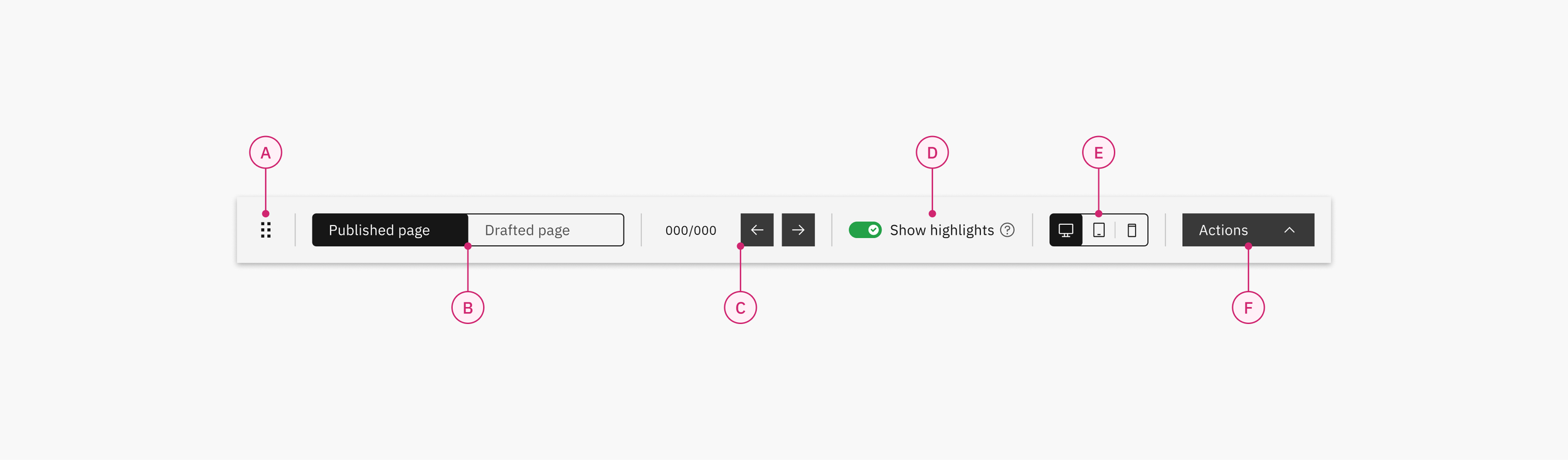
A. Drag & drop: Allows repositioning of the toolbox to tailor accessibility.
B. Page switcher: Allows swapping between the published page, available to visitors and the drafted page, staged for reviewing agent changes.
C. Draft stepper: Allows quick tabbing between individual agent changes to reduce scrolling and scanning.
D. Draft highlights toggle: Allows agent changes to be viewed with or without contextual highlights.
E. Viewport switcher: Allows swapping between desktop, tablet or mobile screen sizes to inspect content before publishing.
F. Action menu: Allows for activation of various tooling related to the page canvas.
Highlight colors: Visual indicators included to help users identify the type of change made by the agent. These colors distinguish between added widgets (green), revised widgets (yellow), removed widgets (red), and suggestions (purple).
Measuring success
Documentation Retrieval
Measured the agent’s ability to successfully navigate documentation and retrieve relevant resources for support inquiries.
65.15%
of support inquiries resolved without human intervention during the first post-launch quarter.
Goal
Resolve at least 50% of support inquiries without human intervention by the end of the first post-launch quarter.
Rationale
Support inquiries were categorized as duplicate inquiries or unique inquiries. Analysis showed that approximately 69% of inquiries were duplicates, while unique inquiries accounted for the remaining 31%. When compared, the agent was expected to reach proficiency quicker when resolving duplicate requests, making it an ideal focus for the POC.
Auditing Accuracy
Measured how closely the agent’s auditing and recommendation patterns aligned with expected human review outcomes.
32.9%
of agent-generated recommendations were approved during the first post-launch quarter.
Goal
Achieve at least a 20% approval rate on agent-generated recommendations during the first post-launch quarter.
Rationale
By using Retrieval Augmented Generation (RAG), hallucinations for documentation placement can be significantly reduced. With this in mind, the goal becomes increased accuracy over time instead of perfection. Consequently, the audit agent’s goal for the first post-launch quarter would require a modest expectation to account for the residual errors.
Operational Efficiency
Measured the reduction in manual support and maintenance overhead introduced by the AI-assisted workflow.
89
development hours preserved during the first post-launch quarter.
Goal
Preserve at least 74.88 development hours during the first post-launch quarter.
Rationale
Developers spent an average of 15 hours per five day on-call rotation supporting the documentation ecosystem. Of that time, approximately 10.8 (72%) hours were spent responding to support requests, while 4.2 (28%) hours were dedicated to documenting issues and creating tickets. Combined with the expected percentages of the other dimensions, this was estimated to preserve:
6.24† development hours per week
24.96 development hours per month
74.88 development hours per quarter
†Found by adding [50% of 10.8] to [20% of 4.2].
Reflections
During the first post-launch quarter, all metric outcomes had been succeeded and the presentation to stakeholders was well received. The POC’s three month trail even aligned well enough with IBM’s WatsonX challenge for a 2025 submission.
What was surprising? What was learned?
Even after establishing the support channels, inquirers still reached out to developers directly. On further investigation, the developers pointed out this as a recent development, likely attributing it to the rising support congestion. Hearing this brought desire paths to mind e.g. a user will naturally optimize their experience within the boundaries of what is possible instead of what was intended. This changed how the problem was perceived: Maybe the ideal self-service experience is asking the expert a question, as opposed to searching their notes.
Although users preferred a quick reply for support, they didn’t outright oppose a delayed response, with the caveat that, it was time-boxed to fit their schedule. This emphasized unplanned context switching and fragmented conversations as notably unfavorable for user productivity. Coincidently, this was equally detrimental for an on-call developer who needed to reabsorb the context of an issue before resuming intervention. Being a pain-point of both interview groups highlighted this as a key improvement for future tooling. The lesson learned was that if the worse case scenario can’t always be avoided, the experience can still be improved to mitigate it’s impact.
Securing leadership buy-in was one of the most formative challenges of the project. Because the team was understaffed and had limited resources, I stepped outside my role to recruit a developer, manage the project and establish a regular cadence for collaboration.
Finally, I gained a much deeper understanding of structured data when designing AI-assisted workflows. Inconsistent formatting across documentation made reliable parsing and retrieval more difficult, reinforcing that when building dependable AI systems, the quality and consistency of content is just as important as the model itself.
What could have been done differently?
Technical feasibility also influenced several design decisions. Early in the project, we discovered that allowing an AI agent to resume conversations in legacy support threads would introduce significant engineering complexity. Instead, we chose to have the agent summarize previous interventions and provide that context when starting a new conversation. It reinforced the value of shipping the simplest solution that could scale rather than pursuing unnecessary complexity upfront.